Sprunki Christmas Cool As Ice Mod - Play Frosty Holiday Music Game
About Sprunki Christmas Cool As Ice Mod - Play Frosty Holiday Music Game
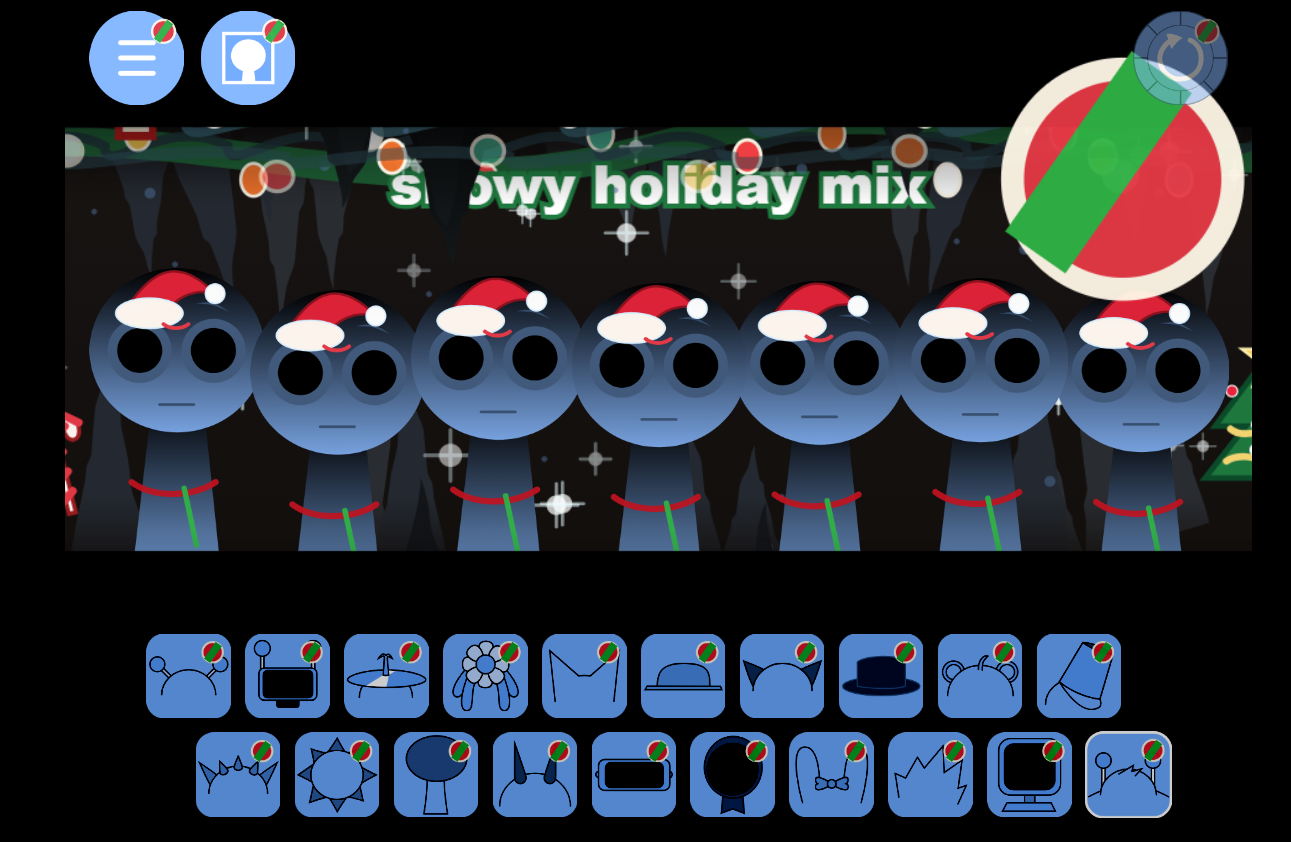
Sprunki Christmas Cool As Ice Mod is a festive winter remix of the Sprunki music-mixing experience, blending icy visuals, Christmas-inspired sounds, frozen character designs, and playful holiday energy into one creative rhythm playground. Instead of simply making a normal beat, players build a snowy soundtrack filled with jingle-like melodies, frosty effects, cool vocals, and charming seasonal animations.
This mod takes the familiar drag-and-drop Sprunki formula and gives it a full Christmas winter makeover. Characters appear with frozen textures, snowy costumes, icy colors, and holiday details that make every mix feel like it belongs inside a glowing winter wonderland. Each character adds a different sound layer, from crisp percussion and cold synth tones to playful vocals, bells, effects, and atmospheric loops.
A Frosty Christmas Music Experience
The main appeal of Sprunki Christmas Cool As Ice Mod is its balance between simple music creation and festive visual fun. You do not need music knowledge to enjoy it. Just choose characters, place them on the stage, and listen as your track grows layer by layer. Every combination can change the mood of the song, making it easy to create something cheerful, mysterious, relaxing, or icy-cool.
The Christmas theme gives the mod a warmer emotional tone, while the Cool As Ice style adds a crisp frozen atmosphere. Snow effects, icy character designs, winter lighting, and hidden animations help make the experience feel more alive. It is a good choice for players who enjoy Sprunki mods with strong visual identity, seasonal themes, and creative remix freedom.
Why Play Sprunki Christmas Cool As Ice?
- Christmas Winter Theme: Enjoy a snowy holiday atmosphere with frozen Sprunki characters and festive sound design.
- Easy Drag-and-Drop Gameplay: Place characters on the stage to activate beats, melodies, vocals, and effects.
- Creative Music Mixing: Combine different sound layers to build your own Christmas-inspired track.
- Icy Visual Style: Frozen textures, snowy details, and cool color palettes create a strong winter mood.
- Hidden Combos: Try different character combinations to discover special animations or bonus sound moments.
- Relaxing and Replayable: There is no strict right or wrong way to play, so every session can create a new mix.
Game Overview
In Sprunki Christmas Cool As Ice Mod, your goal is to create a unique holiday track by experimenting with the available character lineup. Each character represents a different musical element. Some may bring rhythm, some may add melody, while others introduce vocals, sound effects, or atmospheric winter tones. By layering them together, you can create a full song that feels festive, icy, and fun.
The mod is especially enjoyable for fans of Sprunki, Incredibox-style music games, Christmas games, winter-themed mods, and casual rhythm experiences. Whether you want to make a cheerful holiday beat or a colder, mysterious winter remix, the game gives you enough freedom to experiment and discover your own sound.
How to Play Sprunki Christmas Cool As Ice Mod - Play Frosty Holiday Music Game
Sprunki Christmas Cool As Ice Mod is easy to play. The game is built around character-based music mixing, so your main task is to place different Sprunki characters onto the stage and combine their sounds into a complete track.
1. Choose Your Icy Christmas Characters
Start by looking through the available character icons. Each character has a unique sound, visual style, and role in the mix. Some characters may create beats, while others add melodies, vocals, bells, effects, or frozen background sounds.
2. Drag and Drop Characters onto the Stage
Drag a character onto an empty slot to activate its sound. Once placed, the character will begin performing its part of the track. Add more characters to build a richer and more complete Christmas remix.
3. Mix Beats, Melodies, Vocals, and Effects
Try combining different sound types together. A good mix usually includes rhythm, melody, vocals, and special effects. Experiment with different orders and combinations to find the sound you like best.
4. Discover Hidden Combos
Some character combinations may trigger special animations, bonus effects, or unique musical moments. Keep testing different lineups to unlock all the surprises hidden inside the mod.
5. Remove or Switch Characters Anytime
If a sound does not fit your track, remove that character and try another one. The best part of Sprunki-style gameplay is real-time remixing, so you can adjust your song whenever you want.
6. Create Your Own Holiday Track
Once you find a combination you enjoy, let the track play and enjoy your custom Christmas Cool As Ice remix. Replay the game to create different versions with new moods, rhythms, and frozen holiday energy.
- Tip: Start with a beat character first, then add melody and vocals.
- Tip: Use effects characters to make your mix feel more icy and atmospheric.
- Tip: Try unusual combinations to discover hidden animations.
- Tip: Remove one character at a time to hear how each sound changes the full mix.
Related Games